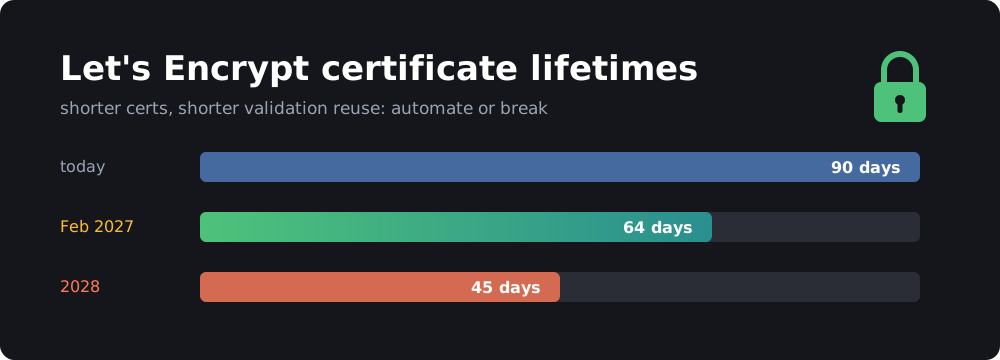
Let’s Encrypt announced on October 7 that its default certificates will drop from 90 days to 64 days on February 10, 2027. A further cut to 45 days is coming in 2028.
If your renewals are fully automated and your ACME client is reasonably recent, you probably don’t need to do anything. If you have a cron job someone wrote in 2019 that renews “every 60 days”, you have until February to fix it. This post covers what is changing and how to check your setup in about five minutes.
TL;DR
- From Feb 10, 2027, new and renewed Let’s Encrypt certificates are valid for 64 days. 45 days follows in 2028.
- Clients with ARI support (certbot 4.1+, acme.sh 3.1.4+, Caddy) renew at the right time automatically.
- Look for hard-coded day counts (
60,80,83) in cron jobs and scripts. Those are what break.- Staging already issues 64-day certificates, so test now with
--dry-run.
What exactly is changing?
According to the official announcement:
| What | Now | Feb 10, 2027 | 2028 |
|---|---|---|---|
| Default certificate lifetime | 90 days | 64 days | 45 days |
| Authorization (validation) reuse | 30 days | 10 days | 7 hours |
A few details that matter:
- Only the default
classicprofile changes. If you already opted into the shorter 45-day or 6-day profiles, nothing changes for you. - No certificates get revoked. Existing 90-day certificates stay valid until they expire. The last one should expire around May 11, 2027.
- Rate limits, ACME endpoints and certificate chains are unchanged.
- Staging switched to 64 days on October 14, 2026, so you can test against it today.
Why are they doing this?
The CA/Browser Forum, the group of browser makers and certificate authorities that sets the rules for public TLS, has voted to bring the maximum certificate lifetime down in steps over the next few years. Shorter lifetimes limit how long a stolen key or wrongly issued certificate stays useful. They also make revocation less important, since revocation has never worked well in practice. Let’s Encrypt is moving ahead of those deadlines in stages instead of making one big jump.
The validation reuse change also matters. Today, once you prove you control a domain, Let’s Encrypt reuses that proof for 30 days. That window shrinks to 10 days and later to 7 hours. In practice, almost every renewal will need a fresh HTTP-01 or DNS-01 challenge, so your challenge setup has to keep working too. That means port 80 reachable or DNS API credentials still valid.
Who is actually affected?
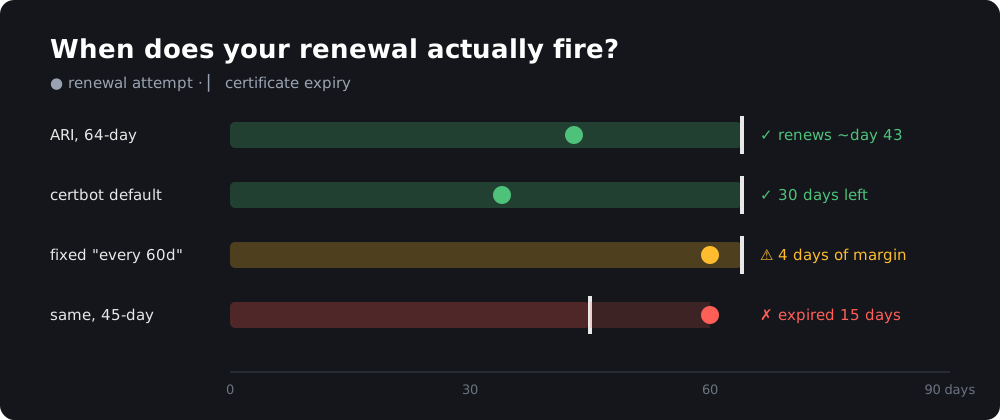 Renewal timing on a 64-day certificate. Fixed schedules are the risk.
You’re fine if your client checks expiry (or asks Let’s Encrypt via ARI) at least once a day and renews when it’s told to or when about 30 days are left. That describes most modern clients with their default settings.
You need to act if any of these sound familiar:
- A cron job that runs
certbot renew --force-renewalon a fixed date, or every N days. - acme.sh older than 3.1.4. It renews every 60 days by default, which leaves 4 days of margin on a 64-day certificate and is already 15 days too late once certificates drop to 45 days.
- Manually issued certificates you renew by hand from a calendar reminder.
- A script that copies certificates to a router, NAS, printer or other appliance on its own schedule.
- Anything with “83”, “80” or “60” days written into a config file or a runbook.
Let’s Encrypt’s advice is to renew at roughly two-thirds of the certificate lifetime. That’s about day 43 for a 64-day certificate.
What is ARI and why should you care?
ACME Renewal Information (ARI), standardized as RFC 9773, lets the certificate authority tell your client when to renew. Instead of your client guessing from the expiry date, it asks Let’s Encrypt for a renewal window and renews inside it.
That has two benefits:
- Lifetime changes don’t matter. 90, 64 or 45 days, the client simply renews when the window opens.
- Early renewal during incidents. If Let’s Encrypt ever needs to revoke a batch of certificates, it can move the window earlier and ARI clients will replace their certificates before the revocation happens.
If your client supports ARI, the 64-day change is a non-event.
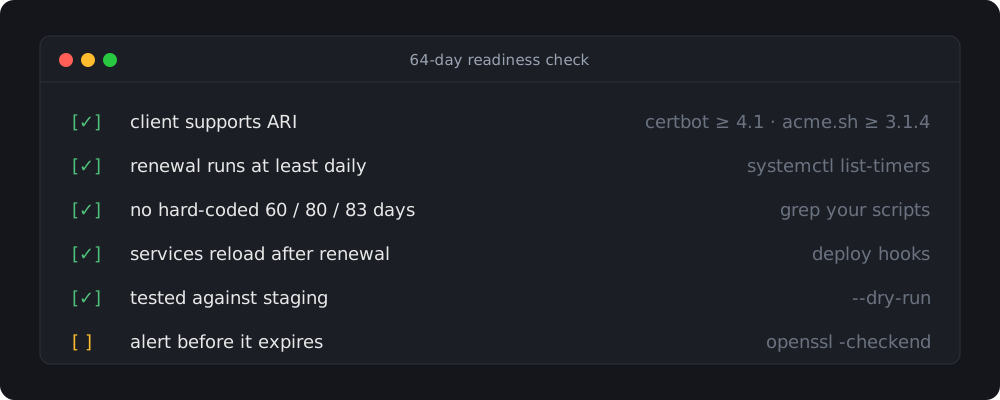
The 5-minute readiness check
1. Check your client version
certbot --version     # want 4.1.0 or newer (4.1.1+ recommended)
acme.sh --version     # want 3.1.4 or newer
caddy version
traefik version
Certbot added ARI in 4.1.0, and certbot renew uses it automatically. acme.sh added ARI in 3.1.4 and turned it on by default.
Watch out for distro packages. The certbot in older Ubuntu and Debian LTS releases can be a 2.x version. It still renews 30 days before expiry, which works for 64-day certificates, but it won’t use ARI. If you want ARI, the snap is the officially supported way to get a current certbot.
2. Check how often renewal runs
Renewal should run at least once a day. Twice a day is better.
# systemd timers (certbot's snap and most distro packages use one)
systemctl list-timers | grep -Ei 'certbot|acme'

# cron
sudo crontab -l | grep -Ei 'certbot|acme'
crontab -l | grep -Ei 'certbot|acme'
ls /etc/cron.d/ | grep -Ei 'certbot|acme'
If you find a monthly cron job or one with a fixed day-of-month, replace it with a daily one. Running certbot renew daily is harmless, because it does nothing until a renewal is due.
3. Hunt for hard-coded day counts
# certbot: renew_before_expiry in renewal configs
sudo grep -r renew_before_expiry /etc/letsencrypt/renewal/

# acme.sh: Le_RenewalDays in per-domain configs
grep -r Le_RenewalDays ~/.acme.sh/*/*.conf

# your own scripts
grep -rnE -- '--days|force-renew|\b(60|80|83) ?days?\b' /etc/cron* /usr/local/bin ~/bin 2>/dev/null
With certbot 4.1+, an ARI window that opens earlier than your renew_before_expiry setting wins. With older clients, renew_before_expiry is the only thing deciding when to renew, so make sure it’s comfortably below 64 days (the default 30 days is fine).
4. Make sure services reload
Getting a new certificate onto disk is only half the job. Nginx, Postfix, Home Assistant or Mosquitto keep serving the old certificate until they reload. With certificates expiring more often, a missing reload shows up much sooner.
For certbot, put reload commands in a deploy hook:
sudo tee /etc/letsencrypt/renewal-hooks/deploy/reload-services.sh <<'EOF'
#!/bin/sh
systemctl reload nginx
EOF
sudo chmod +x /etc/letsencrypt/renewal-hooks/deploy/reload-services.sh
For acme.sh, use --reloadcmd when installing the certificate:
acme.sh --install-cert -d example.com \
  --key-file /etc/nginx/ssl/example.com.key \
  --fullchain-file /etc/nginx/ssl/example.com.crt \
  --reloadcmd "systemctl reload nginx"
5. Test against staging
Staging has been issuing 64-day certificates since October 14, so a dry run tests the real thing:
sudo certbot renew --dry-run
acme.sh doesn’t have a dry-run mode. Don’t run --renew --staging on a live certificate, because it would replace it with an untrusted staging certificate. Instead, issue a throwaway certificate with a separate config directory:
acme.sh --issue --staging -d example.com -w /var/www/html \
  --config-home ~/acme-staging-test
A dry run doesn’t save the certificate. To check the lifetime of the certificate you’re actually serving (after February 10, notAfter should be 64 days after notBefore):
openssl x509 -noout -dates -in /etc/letsencrypt/live/example.com/fullchain.pem
Client-by-client notes
certbot. Version 4.1+ with ARI handles this for you, and so does 2.x with default settings. The things that break are custom cron jobs and --force-renewal. If you followed my old Let’s Encrypt + nginx guide, you’re using the standalone authenticator, so port 80 has to be free or reachable at renewal time. With validation reuse going down to 10 days, that will be almost every renewal.
acme.sh. Upgrade with acme.sh --upgrade to get ARI. If you set a custom --days value when you issued a certificate, check Le_RenewalDays in its .conf file.
Caddy. Caddy manages renewals itself and supports ARI. If you let Caddy handle TLS, there’s nothing to do. Just keep it updated.
Traefik. Traefik renews based on its certificatesDuration setting, which defaults to 90 days and makes it renew when 30 days are left. That still works for 64-day and 45-day certificates. Traefik uses the lego library under the hood, so keeping Traefik up to date also gets you lego’s ACME improvements.
Nginx Proxy Manager / Home Assistant Let’s Encrypt add-on. Both use certbot internally. Keep the container or add-on updated and they’ll follow certbot’s behavior.
Appliances (routers, NAS, printers, Proxmox). These are the likely failures. If a script pushes certificates to a device, make sure it runs on every renewal (as a deploy hook) and not on a separate schedule.
Don’t fail silently: add an expiry alert
Even with everything automated, you want to hear about it before a certificate expires, not from a browser warning. A short script with openssl -checkend is enough:
#!/usr/bin/env bash
# check-certs.sh — warn if any certificate expires within 14 days
DAYS=14
for host in example.com ha.example.com git.example.com; do
  if ! echo | openssl s_client -servername "$host" -connect "$host:443" 2>/dev/null \
      | openssl x509 -noout -checkend $((DAYS * 86400)) >/dev/null; then
    echo "WARNING: $host certificate expires within $DAYS days"
  fi
done
Run it daily from cron and send the output to email, ntfy or MQTT. If you already run Uptime Kuma, its HTTP monitors have a built-in certificate expiry notification, so you just need to turn it on.
FAQ
Will my existing certificates be revoked? No. Certificates issued before February 10, 2027 keep their 90-day lifetime and expire normally.
Do I need to change anything if I use Caddy? No. Caddy manages renewals automatically and supports ARI.
Will I hit rate limits by renewing more often? Let’s Encrypt says rate limits are not affected by this change. A 64-day certificate renewed at day 43 means roughly 8–9 renewals a year instead of about 6.
Can I keep getting 90-day certificates? No. After February 10, 2027, the longest lifetime Let’s Encrypt offers by default is 64 days. You can opt into shorter ones (45 or 6 days) through profiles.
What about the 45-day change in 2028? If your setup passes the checks above, it will handle 45 days too. The fixed-schedule setups that barely survive 64 days are the ones that will break.
Conclusion
The 64-day change is mostly a test of how well your renewals are automated. Clients with ARI won’t notice it. Hand-written cron jobs and appliance scripts will. Spend five minutes now, while staging already issues 64-day certificates and you have until February, and you’ll be ready for the 45-day change in 2028 as well.