AI coding agents that live in the terminal have gone from a novelty to a normal part of a lot of people’s workflow. You describe what you want, and the agent searches the codebase, edits files, runs commands, and checks its own work. Two of the most talked-about options right now are OpenCode and Claude Code. They look similar at first glance, but they come from very different philosophies, so here’s how they compare.
TL;DR
- OpenCode is open source (MIT), works with almost any model provider, including local models, and is free to use: you only pay for the model.
- Claude Code is Anthropic’s own agent. It only runs Claude models, but it is tuned end to end for them, runs everywhere (terminal, IDE, desktop, web, phone), and has the deeper automation feature set.
OpenCode
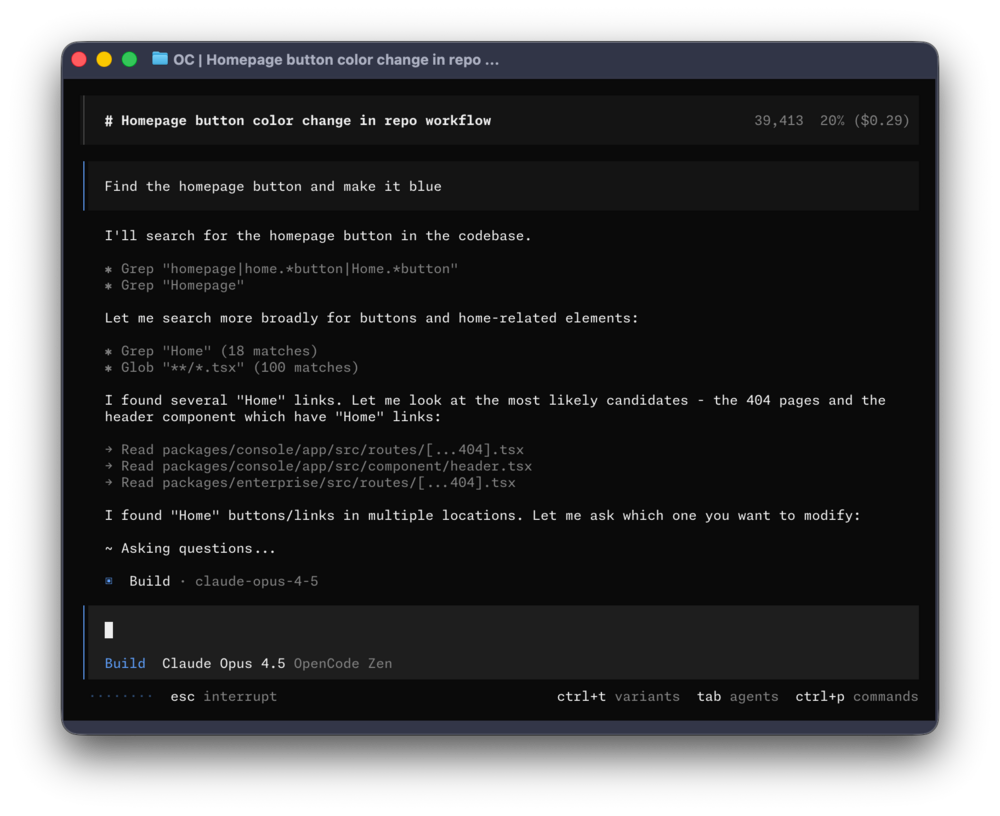 OpenCode’s terminal UI (screenshot from the OpenCode repository).
OpenCode started as a project from the SST team and is now developed by Anomaly. It’s MIT-licensed and has become one of the most-starred projects on GitHub (over 200k stars at the time of writing).
Its biggest selling point is being model-agnostic. Plug in an API key from Anthropic, OpenAI, Google, or dozens of other providers, or point it at a local model through Ollama. If you don’t want to manage several keys, OpenCode also offers its own optional gateway: pay-as-you-go credits for a curated set of tested models (a few of them free for a limited time), plus a subscription plan called OpenCode Go.
Other things worth knowing:
- Build and Plan agents.
Tabswitches between the full-access Build agent and the read-only Plan agent, which asks before running shell commands. There’s also a@generalsubagent for multi-step searches. - LSP built in. OpenCode automatically wires up language servers, so the model gets real diagnostics after it edits code.
- Client/server architecture. The TUI is just one client. There’s also a desktop app (beta) and an IDE extension, and remote clients can connect to a running session.
- Shareable sessions via public links, plus
/undoand/redofor changes. - MCP support for local and remote servers (with OAuth), along with plugins, custom commands, themes, and keybinds.
AGENTS.md./initscans your project and writes anAGENTS.mdwith project instructions.
Install it with the script, a package manager, or Homebrew:
curl -fsSL https://opencode.ai/v2/install | bash
# or
npm i -g @opencode/cli@latest
# or
brew install anomalyco/tap/opencode-v2
Claude Code
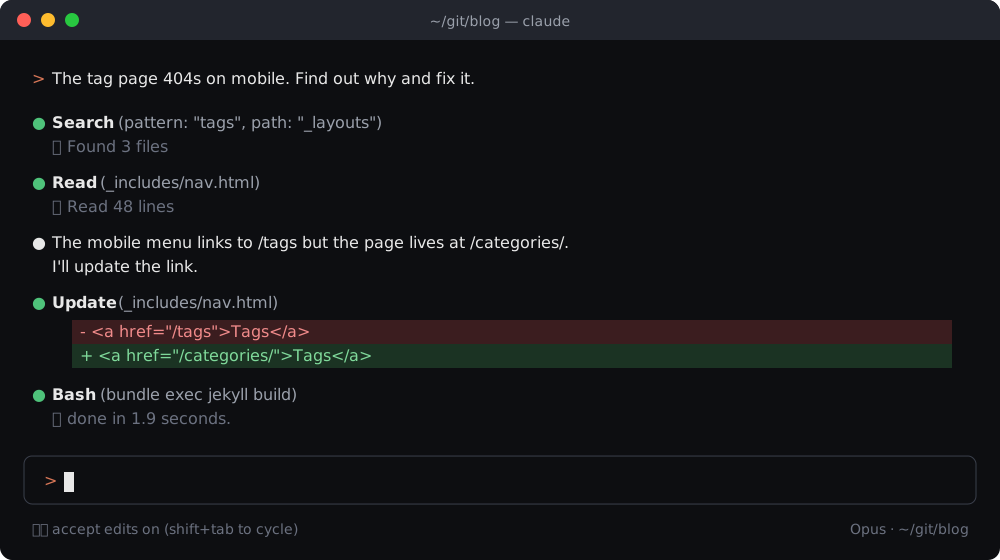 Illustration of a typical Claude Code session in the terminal.
Claude Code is Anthropic’s agentic coding tool. Where OpenCode tries to work with every model, Claude Code goes the other way: it only runs Claude models (Opus, Sonnet, Haiku), and the tool and the models are built by the same company. In practice, that shows up as very solid tool use, long autonomous runs, and new model capabilities landing in the tool on day one.
It’s also no longer “just a CLI”. The same engine runs in:
- the terminal (
claude), - VS Code / Cursor and JetBrains IDEs,
- a desktop app (macOS, Windows, and Linux in beta),
- the web at claude.ai/code and the Claude mobile app,
- plus Slack, GitHub Actions, and GitLab CI/CD.
Sessions can move between surfaces: start something in the cloud, then pull it into your terminal with claude --teleport, or keep an eye on a local session from your phone with Remote Control.
On the customization side, it has the most complete feature set of the two:
CLAUDE.mdfor project instructions (it can also read an existingAGENTS.md), plus auto memory that saves learnings across sessions.- Hooks: shell commands that run before or after actions, for example running a formatter after every edit.
- Skills and plugins to package and share repeatable workflows such as
/review-pr. - Subagents and background agents for parallel work, and the Agent SDK for building your own agents on top of it.
- Scheduled tasks that run in the cloud, on your desktop, or as a
/loopinside a session. - MCP for connecting Jira, Slack, Google Drive, databases, and your own tools.
- A granular permission system with modes you cycle through with
Shift+Tab.
Install it with the native installer (which auto-updates) or a package manager:
curl -fsSL https://claude.ai/install.sh | bash
# or
brew install --cask claude-code
You’ll need a Claude Pro ($20/month, or $17/month billed yearly) or Max (from $100/month) subscription, or an Anthropic API / Bedrock / Vertex account.
How they connect to models
This is the core difference between the two, and the one that should drive your decision:
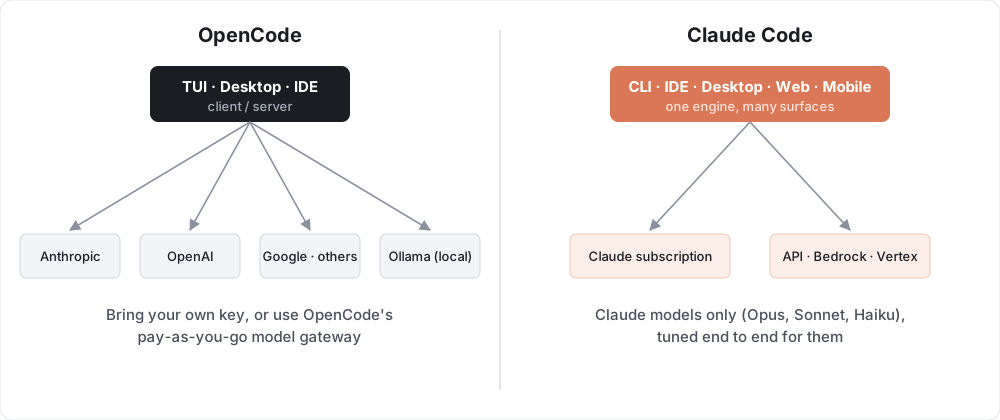
OpenCode gives you choice: you can switch models per task, mix a cheap model for simple work with a frontier model for hard problems, or run fully offline. Claude Code gives you integration: one model family, with a tool designed around how those models work.
A useful detail: OpenCode can use Claude models too. But if you mostly use Claude, a Claude subscription through Claude Code is usually the cheaper and smoother route compared to paying per token through an API key.
Comparison table
| Feature | OpenCode | Claude Code |
|---|---|---|
| Developer | Anomaly (formerly the SST team) | Anthropic |
| License | Open source (MIT) | Proprietary |
| Price of the tool | Free | Included with Claude Pro/Max, or pay per use through the API |
| Models | 75+ providers: Claude, GPT, Gemini, open-weight, local via Ollama | Claude only (Opus, Sonnet, Haiku) |
| Local / offline models | ✅ Yes | ❌ No |
| Terminal UI | ✅ | ✅ |
| Desktop app | ✅ (beta) | ✅ |
| IDE integration | ✅ Extension | ✅ VS Code, Cursor, JetBrains |
| Web / mobile | Remote clients can connect to a session | ✅ claude.ai/code, iOS and Android apps |
| Plan / read-only mode | ✅ Plan agent (Tab) |
✅ Plan mode (Shift+Tab) |
| Subagents | ✅ @general + custom agents |
✅ Subagents, background agents, Agent SDK |
| Project instructions | AGENTS.md |
CLAUDE.md (also reads AGENTS.md) + auto memory |
| MCP | ✅ Local + remote, OAuth | ✅ Local + remote, OAuth |
| Hooks | Through plugins | ✅ First-class hooks |
| Plugins / skills | ✅ Plugins, custom commands | ✅ Plugins, skills, slash commands |
| LSP integration | ✅ Built in, automatic | ✅ Through plugins |
| Undo changes | /undo, /redo |
Checkpoints (Esc Esc / /rewind) |
| Session sharing | ✅ Public share links | Teleport/Remote Control between your own devices |
| CI/CD | Via the CLI | ✅ GitHub Actions, GitLab CI/CD, automated code review |
| Scheduled tasks | Not built in | ✅ Cloud, desktop, and /loop |
| Best for | Model freedom, open source, local models | Best Claude experience, automation, teams |
Which one should you pick?
Pick OpenCode if:
- You want an open-source tool you can read, fork, and self-host.
- You like switching between models, or want to try new open-weight models the day they come out.
- You need to run models locally for privacy, cost, or offline work.
- You already pay for API access from a provider other than Anthropic.
Pick Claude Code if:
- You mainly use Claude models and want the most polished experience with them.
- You want one subscription with predictable cost instead of watching per-token bills.
- You need more than a terminal: IDE, desktop, web, mobile, Slack, and CI all on the same setup.
- You care about automation: hooks, scheduled tasks, GitHub Actions, and building your own agents with the SDK.
There’s also nothing stopping you from using both. A common setup is Claude Code as the daily driver, with OpenCode around for trying other models or running a local one. Since Claude Code can read AGENTS.md, one instructions file can serve both tools.
Both run great in a modern terminal. If icons or status glyphs show up as boxes, install a Nerd Font first, and if you want a file manager to go with your agent, see Best TUI File Managers in 2026.